Well, rewatch logs warnings. Was an issue while migrating an “old” project. For the other issue, I will try the beta lsp version later on.
1 Like
It’s certainly not the last beta.
Thank you all for testing and fixing stuff, we are getting closer every day.
3 Likes
I can see @rescript/react version 0.13.1 fixes the “pipe last” problem.
When using rescript 12, the dependency should be upgraded from 0.13.0 to 0.13.1 at https://github.com/rescript-lang/create-rescript-app/blob/master/templates/rescript-template-nextjs/package.json#L7 and create-rescript-app/templates/rescript-template-vite/package.json at master · rescript-lang/create-rescript-app · GitHub shouldn’t it ?
1 Like
I’m running beta1 in a production system that runs 24/7 with high-performance parts, lots of system calls, approx 12k lines of code. It’s great and feels like an rc, and has felt like an rc even since it was in alpha.
The one thing that needs to stabilize are certain apis (e.g., rescript-vitest-plugin is broken now because of rewatch).
Also finally, I can’t give this community a big enough thanks. NOTHING comes close to rescript in terms of dx for me in the js universe. my main gripes with rescript: 1) lacking early return 2) some stdlib apis are somewhwt lacking, could be more complete and 3) i don’t like camel case, would prefe rsnake case throughout but yeah, this is a reasonable choice given js universe…
thanks to all of the team and community for having created this absolutely fantastic language/compiler/etc which is ultimately the only sane way to write node apps today. (ok sometimes i have to revert to typescript because i can’t do type magic in rescript which is sometimes helpful, type unions and whatnot)
6 Likes
Language Server v 1.63.0-next does its job 
2 Likes
I’ve been glad to early.
The language server (v 1.63.0-next-e18a3cd.0) doesn’t refresh errors in my code.
When I have an error (neovim shows the error correctly) and I fix it, it still shows me the error (s screenshot).
I have to restart the server or neovim to update the state.
Maybe someone with VSCode or some other IDE can try it out  .
.
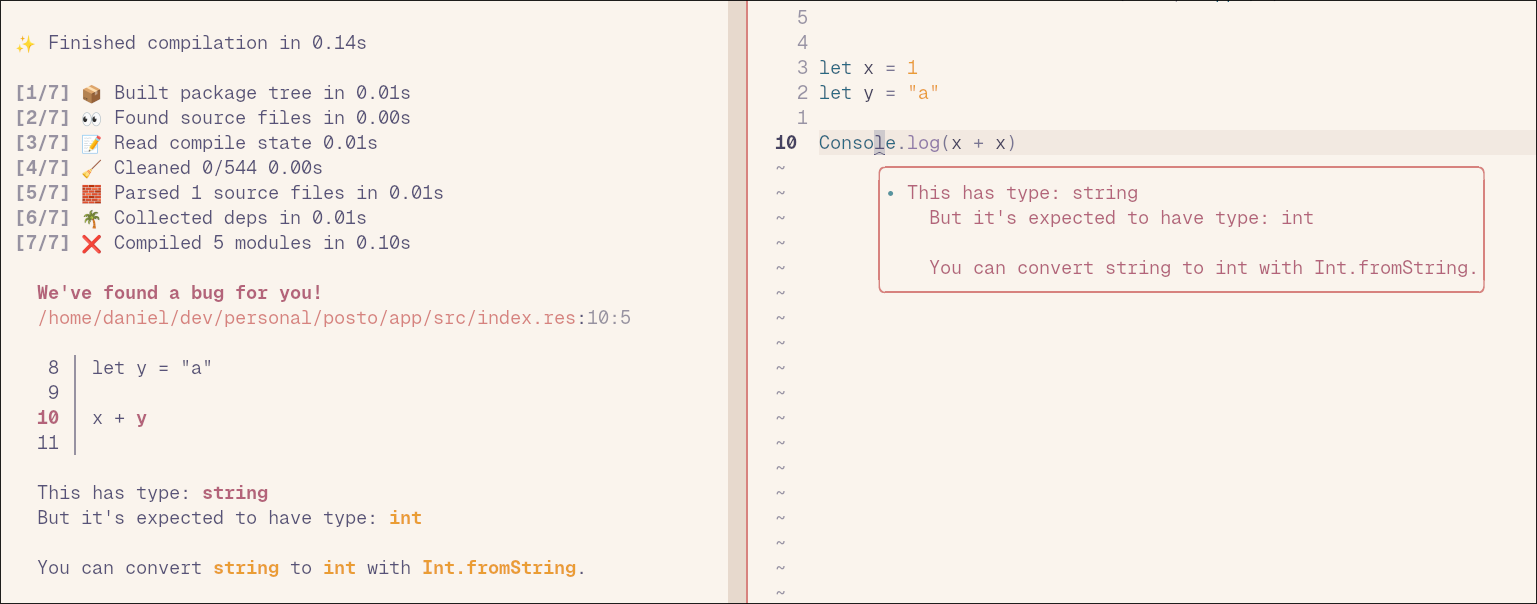
Edit: Same with rescript legacy build -w.
Edit2: Probably the removal of chokidar causes the issue?! So I have to change my neovim config somehow to recognize file changes.
Edit 3: Just for the sake of completeness:
Added the following capabilities to my lsp config and now file changes will be tracked.
capabilities = {
    workspace = {
        didChangeWatchedFiles = {
            dynamicRegistration = true,
        },
    },
}
1 Like
Is that problem already tracked somewhere?
If not, can you provide a sample to reproduce?
We’ve been making some Rewatch fixes this week.
Does Edit 3 fix the problem?
When I removed chokidar, I did do a quick google if neovim is capable of watching files, and the internet said so.
We can add that snippet to the docs if that fixes it.
Yes, edit 3 fixes the problem Everything looks fine now.
The snippet should also be included in the lsp-config repo of neovim. Maybe I will create a pr there.
Where would you add the snippet? In the docs of the language server? Does VSCode handle it automatically?
Yes, with VS Code you have this out of the box.
I don’t know what the best location is to add the snippet. I suppose it is where neovim users would find some info. I didn’t find anything on the rescript org side.
yeah, just using vite-plugin-rescript (sorry, i misnamed it previously) gives this:
[@jihchi/vite-plugin-rescript] error: unexpected argument '-w' found

  tip: to pass '-w' as a value, use '-- -w'

Usage: rescript.exe build [OPTIONS] [FOLDER]

For more information, try '--help'.
ExecaError: Command failed with exit code 2: rescript build -with-deps -w

error: unexpected argument '-w' found

  tip: to pass '-w' as a value, use '-- -w'

Usage: rescript.exe build [OPTIONS] [FOLDER]

For more information, try '--help'.
1 Like
I created a PR in the nvim lspconfig repo. Now I just added the snippet to their readme. After releasing the new version of rescript / the language server, the config should be included in their defaults.
1 Like
beta 2 got released yesterday!
Please give it a spin!
6 Likes
Exciting! I greatly appreciate the work the core team is doing here.
Something that I’ve been curious about for a while now is why the language server basically dies when there is compiler error as it makes debugging the error more difficult. Does rewatch solve this? If not I’d love to be pointed to any conversation around this problem.
1 Like
Could you expand on what you mean? Are you referring to that you don’t get hovers/completions etc under errors?
Yes, these as well as “go to definition”. For instance if I have this syntax error where (customSort) doesn’t have a complete definition, syntax highlighting and basically all language server help stops working.
  let customSort = (items, selected) =>

  @react.component
  let make = (
    ~className="",
  ) => {
    <div className />
  }
Yeah this is a major pain. The reason for this being the way it is is that the compiler is not designed to continue when it encounters a type error. This is because it wouldn’t be able to type check after the type error in a “honest” way.
Good news is we’ve actually prototyped a way of making this work, by having a mode in the compiler that the editor can use, where we tell the type checker to pretend that the type error didn’t happen, and pretend it type checked successfully. This solves this issue for the editor, while letting the regular compile mode work as it does now (strict).
I fully agree this is terrible and that it’d be a huge QoL improvement to fix this. With a little luck it’s something we’ll be able to land before v12 ships, and if not we can hopefully land it close after.
6 Likes
although i agree it would be a nice qol improvement, i never found it to be a major pain. only seeing the next error is fine, because you fix it, and then you immediately see the next anyway. go to definition and syntax highlighting always worked for me beyond errors (doom emacs)
2 Likes
I’m getting this error after updating from the alpha and the legacy compiler to beta.4 and rewatch.
  The module or file Pervasives can't be found.
  - If it's a third-party dependency:
    - Did you add it to the "dependencies" or "dev-dependencies" in rescript.json?
  - Did you include the file's directory to the "sources" in rescript.json?
There currently is no clean happening when you upgrade to a newer version.
If you haven’t tried that yet, you could give that a shot.