This one was solved recently by @cristianoc  I guess the fix will be in the next release.
3 Likes
Some refactoring issues with “Rename Symbol”:
- Can’t rename labelled arguments. The
~seems to be captured and removed in the rename process effectively making it an unlabelled argument. - Can’t rename modules - i.e. If I Rename a module (at the filename level or otherwise) it would be great if it updated all references to that module.
5 Likes
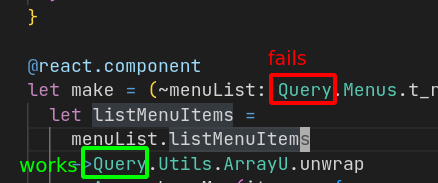
“Go to definition” seems to work in some places but not others. In this example I can go to definition where the module is referenced within the function body but not for the reference in the type definition.
2 Likes
Thank you all for your posts - keep them coming! Here’s a follow up on some of the pain points you’ve described.
Syntax highlighting
To address this in a sustainable way, we are going to experiment with semantic highlighting. Semantic highlighting means doing this: file contents -> parse to ReScript AST -> produce a set of tokens for highlighting from the AST.
While this will mean a larger up front cost for setting up the infra needed etc, we believe this is the best way forward. We’re hoping it’ll make tweaking the highlighting easy and correct, as it’ll be driven by the real parser and actual AST (which of course is 100% accurate), rather than attempting to reproduce parts of the parser via regexp etc.
Also, we’d be very happy if there’s community members who’d be interested in contributing a bit more in depth to this. We’re going to start by setting up the needed infrastructure and so on, but after that there’s likely going to be quite a lot of work in doing the actual highlighting (matching the various AST nodes and producing semantic tokens from them where appropriate). Most of the work is going to be in OCaml (in the analysis bin of the VSCode extension repo). Please reach out if you’re interested in contributing to this!
Feedback without saving
We hear you, and it would be wonderful to have. Unfortunately, this is an area full of complexity and trade offs. There’s still no decision if this is something that’ll be pursued at all, but if it were, it’d likely require potentially invasive changes to the compiler.
A short follow up, thank you all again for posting your pains and thoughts!
14 Likes
TBH I don’t get why 100% accuracy in syntax highlighting matters. IMO good enough accuracy and enough coloring should be fine for all users.
We can achieve good enough accuracy with TM grammars and the maintenance overhead should be much lower than implementing semantic highlighting.
Another question is how good is the performance of semantic highlighting? i think they should be slower than normal TM grammars due rpc calls etc.
I think(may be most of the user’s of rescript) feedback without saving is the most important feature that the ide should have.
2 Likes
My highlighting is also much better than that.
This issue around type inference gets me from time to time. Would love to have that fixed at some point.
Could someone please provide some environment/OS/rescript info to get a clue why types don’t have a colour for some people, me included? It’s really annoying to switch from other languages during the day and have types coloured the same way as members and arguments.
It’s probably caused by your theme… we made a note in the README that lists all supported themes and also has some further links to discuss the technical difficulties:
A general update on syntax highlighting - we’ve made some good progress, and will hopefully be able to invite testers soon. We’re also going to detail what we’ve done, why we’ve done it, trade offs, guiding principles for highlighting going forward etc as soon as we’re ready to.
The results feel encouraging! We look forward to showing you the results and getting your feedback at some point in the not too distant future.
13 Likes
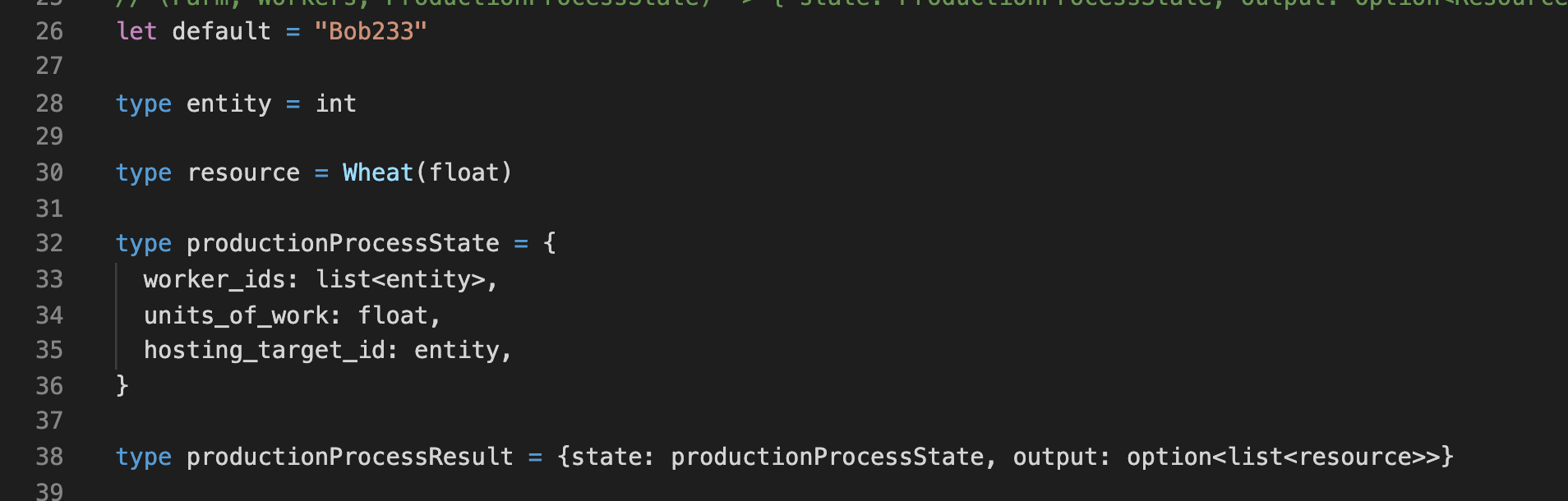
Type coloring should not work for anybody, because it’s just not implemented.
Cool, please let’s not get confused by those invalid claims anymore 
My pet peeve is that code completion based on type t of a module only works when the file has been saved. So chaining with -> doesn’t suggest the right autocomplete suggestions based on the type of the value that is chained while typing. It also doesn’t work after save because intermediate saves are syntax errors. So the only way to have proper autocomplete is to bind to intermediate values.
2 Likes
The same problem with me!
Providing correct types in this scenario is another form of “feedback without saving”. It’s a really hard problem that more or less requires running a second version of the compiler designed specifically for partial compilation. As you’ve noted, saving to run the compiler is impossible because there is technically a syntax error—but something that can compile is required to know what the type of an intermediate value is.
There are a lot of areas like this that need to be reinvented, it’s why I was so annoyed when the team chose to create a brand new extension instead of figuring out how to maintain compatibility with existing tools
6 Likes
Type checking not working without saving the code.
4 Likes
+1 to this. I’d love to be able to get the latest compiler feedback and formatting on every keystroke – perhaps only updating the IDE once formatting works?
1 Like
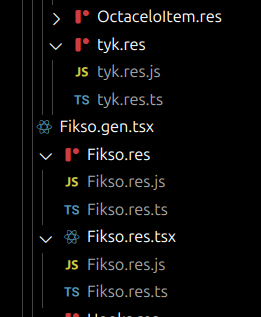
related to vscode not extension but vscode can group related files together like folders, maybe the vscode extension could set the .vscode config via command or popup confirmation based on rescript.json
    "explorer.fileNesting.enabled": true,
    "explorer.fileNesting.expand": false,
    "explorer.fileNesting.patterns": {
        "*.res": "$(capture).res.js, $(capture).res.ts",
    }
1 Like